Sponsored content supplied by Patch DNA.
Learning to produce house music involves decisions that are easier to hear than to explain. A short bass note leaves a different space around the kick from a held one. A chord can feel relaxed with one sound and restless with another. Patch DNA The House is a preset generator for exploring these musical choices inside a compatible DAW on Windows or macOS.
For musicians working with Serum 2, The House offers a way to generate Serum 2 house presets and play them with their own musical ideas. Generate produces another sound to try. More Like This explores related variations around a result that interests you. You can learn through the decisions you make while listening.
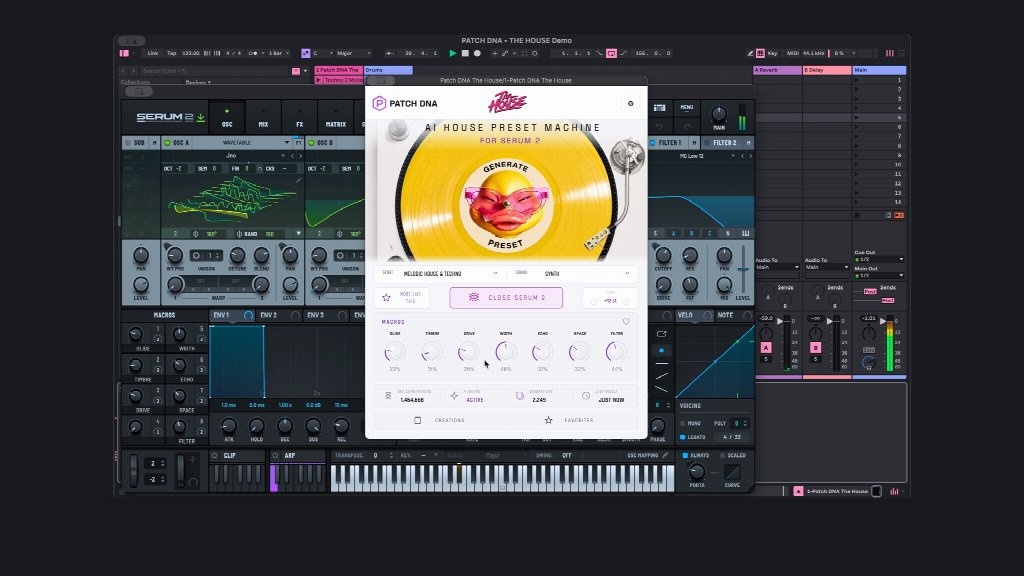
This suits a home-studio session where the aim is to make a piece of music. You might know how to write a few chords and enjoy using preset packs, while still finding detailed synthesis unfamiliar. Those musical skills give you something useful to work with from the beginning.
Give yourself one audible question
Start with a modest project: a drum groove and a short chord progression you can leave playing. Choose a musical direction in The House. Its five directions are Afro House, House, Melodic House & Techno, Progressive & Deep House, and Tech House. Each gives your exploration a setting.
For an Afro House idea, you might already have a percussion pattern with a little space between its accents. Try a simple instrumental phrase in that space. Use Generate, listen to the sound in the session and decide whether you want the notes to continue or stop sooner.
Concentrate on a question you can answer by listening. Perhaps you want the phrase to feel like a response to the percussion. Play it once with a gap before the final note, then once with that note held. The comparison concerns a musical choice you made yourself.
Leave room for an unexpected preference. A sound you initially chose for a small response might be enjoyable enough to become the main phrase. You can save a copy of the project and develop that version without losing the arrangement you began with.
Change one musical part and listen again
After finding a sound that interests you, keep it for a while. Move a note, repeat the end of the phrase or change where the chord comes in. Hearing the same preset in a different part can teach you about the relationship between the sound and the arrangement.
A Tech House sketch offers another useful exercise. Write a short bass figure against the kick, then remove a note from the figure. Listen to how the gap affects the groove. The generated sound is the instrument you are playing; you supply the bass line and decide how it should move.
These small comparisons can give you a vocabulary for your own taste. You might notice that you prefer a compact bass part beneath busy drums, or that a sustained sound gives a sparse section the mood you wanted. Keep your observations tied to the project in front of you. Another track may call for a different choice.
Use related variations for comparison
More Like This provides related sound variations once a result has caught your attention. Keeping the same MIDI phrase while you audition them makes the differences easier to hear. You can compare their musical effect against the chords or drum part already in the session.
A preset pack gives you a fixed collection to browse. The House lets you request further variants around a sound you enjoy. A favourite preset from an existing pack may still belong in the track alongside a generated discovery.
Choose a candidate for the main part and keep another as an alternative. Save separate versions of the DAW project if the sounds lead to different arrangements. After working on the drums or chords, return to the alternatives and hear how each fits the session.
Keep a record of the musical idea
Creations and Favorites help you retain sounds you want to revisit. Save the accompanying MIDI phrase in your DAW project too. A brief audio recording can capture the way the phrase sounded beside the drums, including the pauses that made you choose it.
After a few sessions, those saved examples give you material to compare with your later work. Open an older sketch and hear which choices you still enjoy. You may keep the sound and rewrite the phrase, or bring a saved candidate into a new arrangement.
Active macros and Pitch offer accessible adjustments when you want to change a preset. Full editing remains available in Serum 2, so more detailed sound design can become part of your learning whenever you want to explore it. A separately purchased, installed and activated copy of Serum 2 is required; the product page lists The House’s supported formats and specific system requirements.