If you teach a course with coursework or non-exam assessment, the rulebook changed this term. The new JCQ AI guidance, effective from September 2026, is a substantial rewrite of last year’s edition. Some of the additions will catch out students who think they have done nothing wrong. A Year 12 student who lets Grammarly tidy their draft in Word, or who plans the structure of an investigation with a chatbot, now has to say so and keep the evidence.
In short: the Joint Council for Qualifications lists 52 changes in its updated guidance, against 10 in the April 2025 version. AI used for planning, structuring, spelling, punctuation and grammar must be acknowledged. Students must keep their prompts and the AI’s output, and every NEA student must be given JCQ’s Information for Candidates: AI. AI can help with marking but never as the only marker, and detection software must not be relied on alone. The practical message for teachers is that authenticating work now means evidencing how it was made.
What JCQ has changed for 2026
The document is called AI Use in Assessments: Your role in protecting the integrity of qualifications. It covers coursework, NEA and internal assessment for qualifications from the JCQ awarding bodies, including AQA, OCR, Pearson and WJEC. Supervised exams are mostly untouched. Staff must now watch for wearable technology such as smart glasses, though, and centres must restrict online AI tools on their exam devices.
The April 2025 edition was a tidy-up. This one is a rewrite. Its own table of key changes runs to 52 rows, and the heaviest revision is in the sections on identifying misuse, preventing it and what centres must have in place.
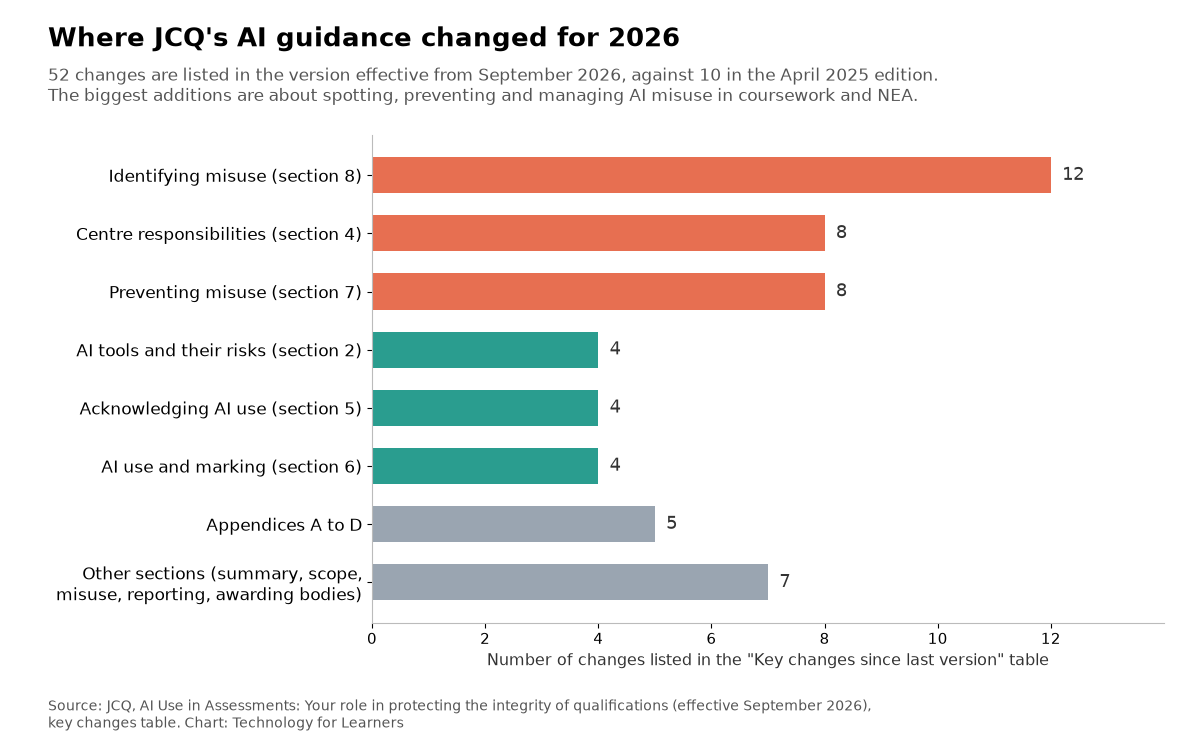
The JCQ AI guidance now covers the quiet uses of AI
The change I would put in front of every Year 11 and Year 12 class is the wider definition of misuse. JCQ now lists failing to acknowledge AI used “as a source of information, guidance, planning or to structure the work” as misuse, along with unacknowledged AI help with spelling, punctuation and grammar. It also names “using translation tools to translate work initially produced in a different language into English” as an example.
That matters because a lot of AI no longer looks like AI. The guidance notes that AI now works “from within everyday productivity tools” and names Grammarly, Microsoft 365 Copilot, Google Workspace AI and Apple Intelligence. A student who accepts a pop-up rewrite may not think of it as AI at all.
Translation deserves particular care in international schools and for students learning English. One case in the appendix involves an A level Art and Design candidate who researched in their own language and translated it into their sketchbook with DeepL. The candidate said they had not realised the tool used AI. The centre estimated that 98% of the content was influenced by AI, and the candidate received zero marks for the component. That is a harsh way to learn the rule at the end of an A level course. It is far better taught in week one.
What students now have to keep
Where AI is allowed, the evidence trail is more demanding. Students must name the specific tool and the date, and JCQ’s examples include “Grammarly (Microsoft Word) 01/07/2026”. Writing “ChatGPT” or “AI” on its own is not enough. They must keep their prompts and the AI’s output as screenshots or another non-editable format, explain briefly how they used it, and hand this in with the work. If an AI tool edits their writing directly, they must keep the original too.
In practice I would build this into the folder from day one. A simple AI log at the back of a Geography NEA takes five minutes to set up: date, tool, prompt, output and what the student did with it. Filling it in as they go beats reconstructing it the night before the deadline, and it gives you something concrete to discuss in progress checks.
Marking with AI, and marking work that used AI
Two separate rules sit in the marking section. The first is about teachers. Centres may allow AI tools to help mark student work, after weighing up data privacy, but “an AI tool cannot be the sole marker”. A human assessor must review all of the work and remains responsible for the mark. Drafting feedback with AI is one of our practical ways teachers can use AI, but for assessed work the judgement stays with a person.
The second rule is about students’ acknowledged use. Honest acknowledgement is not malpractice, but it does not earn marks either. In one worked example, an A level History NEA judged high Level 3, worth 22 to 24 marks, gets 20. The student had relied solely on AI for the section comparing three historical works. In a BTEC Business example, the same reasoning turns a Distinction into a Merit. Assessors should keep clear records whenever acknowledged AI use affects a mark.
Authenticating coursework used to mean judging the finished product. From this year it means being able to show how it was made.
Spotting misuse: lean on process, not detectors
The biggest block of new material is about identifying misuse, and most of it rewards teachers who see work develop. JCQ suggests writing in environments that keep a viewable version history, such as Microsoft 365, Google Workspace for Education, Draftback or Turnitin Clarity. One listed warning sign is a version history showing “a single large insertion of finished text rather than progressive drafting”. It recommends short conversations about the work at several stages, and offers a neat trick: read out part of a sentence from the student’s work and ask them to finish it.
There is a training idea worth stealing for a department meeting. Put your actual task brief into two or three chatbots and compare the answers. You soon learn what generic output for your subject looks like, which helps with what JCQ calls prompt inference.
On detection software the tone has hardened. Tools such as Pangram, Copyleaks and Turnitin may form part of the evidence, but they “can produce both false positives and false negatives”. Their accuracy can vary with a student’s English language competency, and they must not be relied on alone. That chimes with the Australian advice we covered in our piece on cognitive offloading and AI.
I have one reservation. The new appendix lists stylistic features of AI writing, from em dashes and semicolons to American spellings and a table of overused words. JCQ is careful to say that no single feature is conclusive and that many appear in human writing. In a busy marking week, though, a list like this can harden into a checklist. The students most likely to trip it are keen readers and those writing in a second language. Treat the indicators as a reason to have a conversation, never as a verdict.
What to do before the next NEA deadline
Ofqual’s updated approach to AI notes that detected cases remain relatively low, but that there is significant concern about the potential scale of misuse. Most departments can get ahead of this with a few steps this half term:
- Check every NEA student has been given JCQ’s Information for Candidates: AI before starting work, as now required.
- Agree how your centre handles concerns before students sign the declaration. Those cases stay in school and do not go to the awarding body.
- Run a short session showing students what acknowledgement looks like, including Grammarly, translation tools and AI used for planning.
- Collect drafts, plans and version history as the work develops, and book time for brief conversations about it.
- Ask your exams officer to confirm that AI tools are restricted on exam laptops and that students know smart glasses are not allowed.
JCQ’s summary for teachers is a good handout for that department meeting. None of this stops students using AI to learn. Quizzing themselves on content they have been taught is still one of the most sensible uses, as our guide to AI retrieval practice explains. The line is drawn at the work that gets marked.
Frequently asked questions
What is the new JCQ AI guidance?
It is JCQ’s document AI Use in Assessments: Your role in protecting the integrity of qualifications, written for heads of centre, teachers and assessors. The current version took effect in September 2026 and replaces the April 2025 edition, with 52 listed changes.
Do students have to acknowledge Grammarly and translation tools?
Yes, where AI is involved. JCQ lists unacknowledged AI help with spelling, punctuation and grammar as misuse, and gives translating work first written in another language into English as an example of misuse. Check your awarding body’s subject rules as well.
Can teachers use AI to mark coursework?
Only if the centre allows it after considering data privacy, and never as the sole marker. A human assessor must review all of the work and remains responsible for the mark or grade.
Can an AI detector prove a student cheated?
No. JCQ says detection tools can produce false positives and false negatives, and their results should only be one part of a wider judgement that includes drafts, previous work and a conversation with the student.
Has your department changed how it runs coursework under the new JCQ AI guidance? If you have found a way to collect drafts and AI logs that students actually keep up with, tell me about it in the comments.