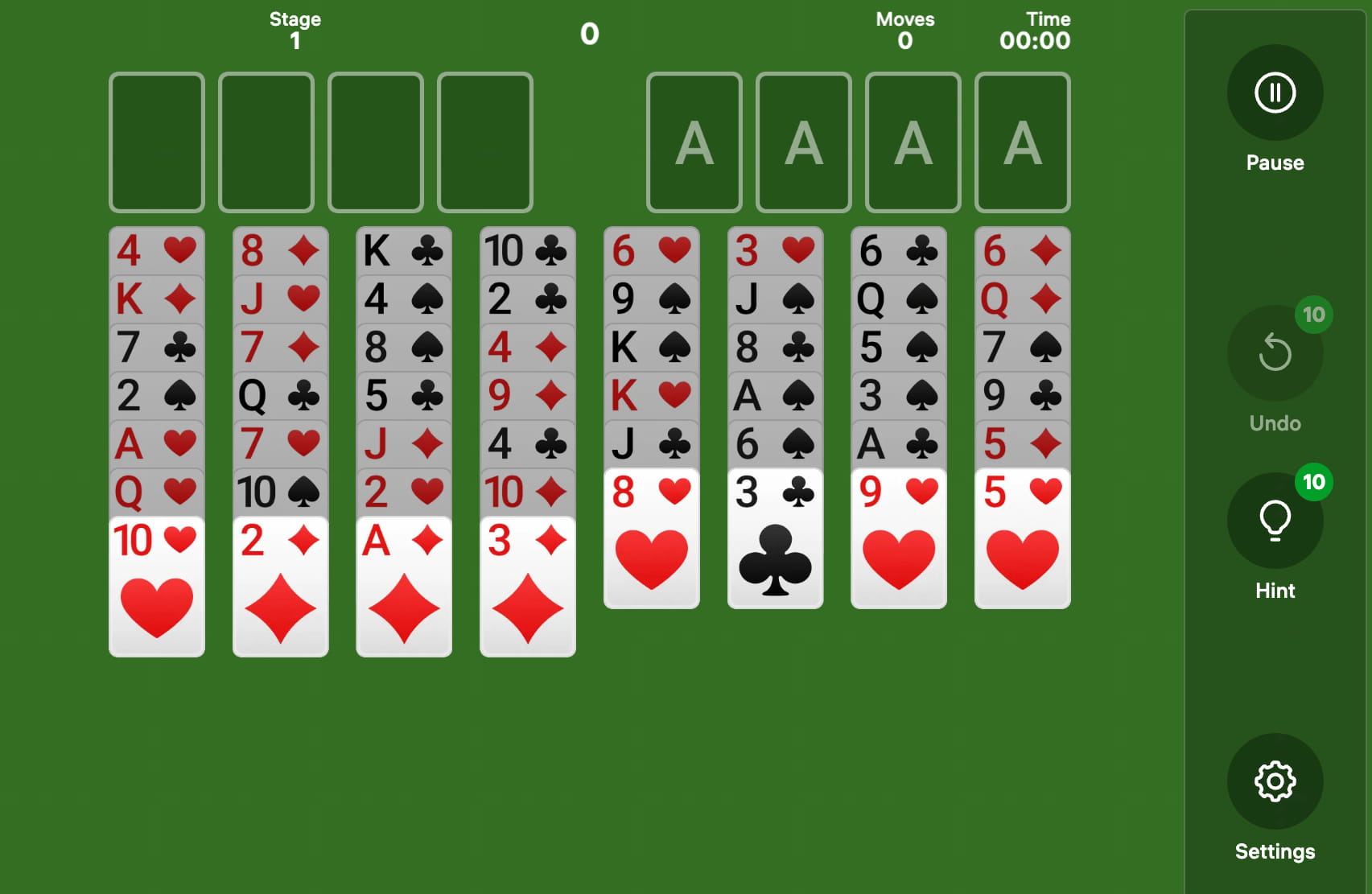
Freecell is a single-player card game built around strategic planning, sequencing, and logical decision-making rather than fast reactions. The standard version uses a 52-card deck across 8 tableau columns, 4 free cells, and 4 foundation piles. Digital platforms such as Easybrain and Solitaire.net make Freecell accessible through modern browsers and mobile devices.
What Is Freecell?
Freecell is a classic solitaire card game in which all 52 cards are visible from the beginning, giving players more information than many traditional card games. Microsoft helped popularize Freecell through Windows, while Easybrain, Solitaire.net, and other digital platforms have brought the format to modern browsers and mobile devices. The primary objective is to move every card to four foundation piles in ascending suit order, starting with the Ace and ending with the King.
Freecell differs from many other solitaire formats because nearly every card is initially exposed. The 8 tableau columns contain the complete 52-card deck, while 4 free cells provide temporary storage for individual cards. Microsoft FreeCell, Easybrain Freecell, and Solitaire.net all use this basic structure while adding different interface and accessibility features.
The four free cells are central to Freecell strategy because each cell can temporarily hold one card. Players must decide when to occupy or clear these spaces because using all four cells can severely restrict future moves. The combination of 8 tableau columns, 4 free cells, and 4 foundations creates a puzzle where individual decisions can influence the board several moves later.
Freecell is also known for its emphasis on planning rather than hidden information. Unlike games where players gradually reveal face-down cards, Freecell presents the entire layout immediately. This makes the game closer to a logical puzzle, with players analyzing sequences, available spaces, alternating colors, and foundation progress before committing to a move.
Key Benefits of Freecell
Freecell encourages strategic planning because players must consider both immediate moves and their potential consequences. Microsoft Solitaire Collection, Easybrain, and Solitaire.net all present Freecell as a structured single-player experience where players can analyze the visible board before making decisions. The absence of hidden tableau cards makes it easier to study different approaches and understand why a particular move succeeds or fails.
Freecell can also support problem-solving skills through repeated sequence analysis. Players regularly evaluate card order, alternating colors, empty columns, and available free cells while working toward four completed foundations. Digital platforms such as Easybrain and MobilityWare make these mechanics easier to practice by providing visual interfaces that clearly distinguish movable cards and available spaces.
Another benefit of Freecell is that it allows players to develop a deliberate playing rhythm. A typical board can be paused while the player considers several possible moves, unlike reaction-focused games that require immediate responses. Solitaire.net, Microsoft Solitaire Collection, and browser-based Freecell platforms allow users to return to the same type of structured puzzle repeatedly.
Freecell also provides measurable progress through completion rates, move counts, and solving efficiency. Players can compare how many moves they use to complete different boards or experiment with alternative solutions. Microsoft Solitaire Collection and other digital solitaire platforms commonly include statistics that allow players to monitor their performance over time.
Freecell offers an accessible way to practice logical sequencing without requiring specialized equipment. A standard 52-card deck is enough to understand the underlying rules, while digital versions provide automatic card movement and visual feedback. Easybrain and Solitaire.net make the format available through browsers, reducing the need for dedicated gaming hardware or complicated setup.
How Freecell Works
A standard Freecell board begins with 52 cards distributed across 8 tableau columns. The first four columns contain 7 cards each, while the remaining four columns contain 6 cards each. All cards are face-up, creating a complete information puzzle from the first move.
Players build tableau sequences in descending numerical order while alternating red and black suits. For example, a black 9 can be placed beneath a red 10, while a red 8 can follow a black 9. Hearts and diamonds are red, while clubs and spades are black, creating two alternating color groups used throughout the tableau.
The four free cells provide temporary storage for individual cards. A player can move a card into an empty free cell to access a card underneath it or create another sequence elsewhere on the board. Microsoft Freecell, Easybrain, and Solitaire.net visually represent these spaces so players can quickly identify available storage.
The four foundation piles are built upward by suit, beginning with the Ace and continuing through the King. An Ace of Hearts, for example, starts the Hearts foundation, followed by the 2 of Hearts, 3 of Hearts, and subsequent cards through the King. Completing all four foundations requires moving all 52 cards from the tableau into their corresponding suits.
Empty tableau columns are particularly valuable because they can accommodate a sequence rather than only one card. Creating an empty column can therefore provide considerably more flexibility than simply clearing a free cell. Experienced Freecell players often prioritize moves that create open columns while preserving enough free cells to maintain mobility.
The number of cards that can be moved as a sequence depends on the available empty spaces. The exact mechanics vary slightly between digital implementations, but the general principle is that more open free cells and empty tableau columns allow longer sequences to be transferred. This makes space management one of the most important strategic elements in Freecell.
Freecell Use Cases
Freecell works well as a short mental activity because a single board can be played at an individual’s preferred pace. Office workers, students, and casual players can complete a board during a break without needing a multiplayer connection or continuous session. Browser platforms such as Solitaire.net and Easybrain make these short sessions accessible from computers and mobile devices.
Freecell is also useful for players who enjoy logic puzzles but prefer familiar card mechanics. Sudoku, chess, and traditional solitaire share an emphasis on planning, but Freecell adds a visual sequencing system based on a standard 52-card deck. Players who enjoy organizing information and testing different solutions may find the format particularly engaging.
The game can also serve as an introduction to strategic digital gameplay for people who do not regularly play modern video games. Freecell uses simple controls such as clicking, tapping, or dragging cards, while the underlying decisions become progressively more complex. Microsoft Solitaire Collection, Easybrain, and Solitaire.net all use recognizable card imagery that reduces the initial learning curve.
Freecell is suitable for casual offline-style entertainment because the core game does not require interaction with other players. A player can focus entirely on the board and stop whenever necessary. Mobile and browser implementations from Microsoft and Easybrain make this format convenient for travel, waiting periods, or short breaks.
Freecell can also be used as a way to study decision-making patterns. Because the entire board is visible, players can replay similar positions and compare different sequences of moves. Digital versions that provide undo functionality allow users to test an alternative decision without restarting the entire board.
Easybrain vs Alternatives
Easybrain’s Freecell experience focuses on straightforward browser access and a clean interface that keeps attention on the cards. Solitaire.net provides Freecell through a web-based format, while Microsoft Solitaire Collection combines Freecell with other established solitaire variants. The main difference between these platforms is therefore less about the underlying rules and more about interface design, features, and the surrounding game library.
Microsoft Solitaire Collection offers a broader ecosystem that includes Klondike, Spider, Freecell, Pyramid, and TriPeaks. Its integration with Microsoft’s gaming environment provides additional statistics, achievements, and daily challenges. Easybrain and Solitaire.net provide a more focused experience for users who want to access individual solitaire formats directly through a browser.
Mobile-focused alternatives such as MobilityWare emphasize touch controls and device-specific layouts. Easybrain and Solitaire.net similarly adapt Freecell interfaces for smaller screens while maintaining the traditional 8-column structure. The choice between platforms can depend on whether a player prioritizes browser accessibility, mobile features, statistics, or a larger collection of solitaire variants.
Freecell also differs from Spider Solitaire in its approach to information management. Freecell exposes all 52 cards at the start, whereas Spider Solitaire uses two decks and requires players to work through more complex tableau arrangements. Players interested in visible-information puzzles may find Freecell more straightforward to analyze.
Compared with Klondike Solitaire, Freecell provides more control over the initial board because every card is visible. Klondike introduces additional uncertainty through face-down cards and stock cards, while Freecell emphasizes planning within a known configuration. Both formats use foundations and tableau sequences, but their strategic challenges are different.
For players interested in exploring the format directly, [LINK] Easybrain Freecell on Solitaire.net provides browser-based access to the classic 52-card puzzle. The format requires no multiplayer coordination, allowing users to focus on card sequencing, free-cell management, and foundation building.
Frequently Asked Questions
What is Freecell and how do you play it?
Freecell is a single-player card puzzle played with 52 cards, 8 tableau columns, 4 free cells, and 4 foundation piles. Players arrange tableau cards in descending alternating-color sequences before moving every suit from Ace through King to its foundation.
How many cards are used in Freecell?
Freecell uses exactly 52 cards from one standard deck. Microsoft Freecell, Easybrain, and Solitaire.net follow the traditional one-deck structure, with all 52 cards distributed across 8 tableau columns at the beginning.
What are the four free cells used for?
The four free cells temporarily hold one card each and help players reorganize tableau sequences. Using all 4 spaces simultaneously can reduce available moves, so experienced players generally treat free cells as limited strategic resources.
Is Freecell based more on strategy than luck?
Freecell emphasizes strategy because all 52 cards are visible from the beginning. Unlike games with hidden cards, players using Microsoft Solitaire Collection or Solitaire.net can analyze the complete board before deciding which sequences to move.
What is the goal of Freecell?
The goal is to move all 52 cards into 4 foundation piles, with each pile containing one suit in ascending order from Ace through King. Easybrain and Microsoft Freecell use this traditional objective while adding digital controls and interface features.
Why are empty columns important in Freecell?
An empty tableau column provides additional space for reorganizing cards and can hold a sequence under the game’s movement rules. Freecell players often work toward creating empty columns because open tableau space can provide more flexibility than the 4 individual free cells.
Is Freecell harder than regular Solitaire?
Freecell can feel more strategically demanding because all 52 cards are visible and many moves require planning several steps ahead. Klondike Solitaire, Microsoft Freecell, and Solitaire.net use different mechanics, so difficulty ultimately depends on the player’s familiarity with each format.
Can I play Freecell online without downloading an app?
Yes, browser-based platforms such as Solitaire.net allow Freecell to be played directly online without installing dedicated software. A standard 52-card layout, 8 tableau columns, 4 free cells, and 4 foundations form the basis of the digital experience.